
Access Control Credentials: Programming, Formats and Cloning Risk
Knowledge Base › Access Control · Last reviewed September 2026 · Connixtech technical team
A credential is what a person presents at a reader — a card, fob, PIN, phone or fingerprint. Programming one means three separate jobs: enrolling the number, linking it to a person, and granting that person an access level. Miss the third and a perfectly enrolled card is refused at every door.
Before any of that, though, there is a decision most quotes skip: which credential technology. That choice determines whether the site’s cards can be copied in a car park in under a minute.
Which credential technologies can be cloned?
This is the part of the specification that matters most and gets the least attention. Cloning tools that used to be specialist equipment are now inexpensive consumer devices.
| Technology | Freq | Security | Cloning risk |
|---|---|---|---|
| EM4100 / EM4200 | 125 kHz | None | Trivial — fixed ID, no encryption |
| HID Prox | 125 kHz | None | Trivial — static ID, seconds to copy |
| MIFARE Classic | 13.56 MHz | Crypto1, 48-bit | Broken — practical attacks published |
| MIFARE Plus (SL3) | 13.56 MHz | AES-128 | No known practical attack |
| DESFire EV2 / EV3 | 13.56 MHz | AES-128, EAL5+ | No known practical attack |
| HID Seos | 13.56 MHz | AES-128, EAL5+ | No known practical attack |
125 kHz was designed for identification, not security. The card transmits a fixed number with no encryption, no authentication and no challenge-response. Any reader emitting the right signal receives the full credential. Writable blank tags that emulate EM4100, HID Prox and Indala cost a few dollars.
What about MIFARE Classic?
MIFARE Classic uses Crypto1, a proprietary 48-bit stream cipher NXP designed in the 1990s. It has been thoroughly broken — key-recovery attacks are published, tooling is freely available, and a card using default keys can be copied in about a minute. NXP itself acknowledges this and recommends migrating to DESFire EV2 or EV3.
Enormous numbers of buildings still run MIFARE Classic because replacing every reader and reissuing every card is expensive. That is a legitimate commercial decision, but it should be a decision the client makes knowingly, not a default they inherit.
Migration options for an existing site
- MIFARE Plus is a drop-in AES upgrade path. Cards run in SL1 mode, readable by existing Classic readers, then switch to SL3 (AES-128) once the readers are upgraded — so the card rollout and the reader rollout do not have to happen on the same weekend.
- DESFire EV2 / EV3 is the recommended endpoint for new work. AES-128, mutual authentication, diversified keys, EAL5+ certified hardware.
- Multi-technology readers read both old and new credentials during a transition, which is what makes a phased migration possible at all.
- UID-diversified keys are a partial mitigation if a site must stay on Classic: derive a unique key per card from its UID so compromising one card does not compromise the estate. It does not fix the cipher.
Credentials and readers: Card & Tags, Readers.
The four things that must line up
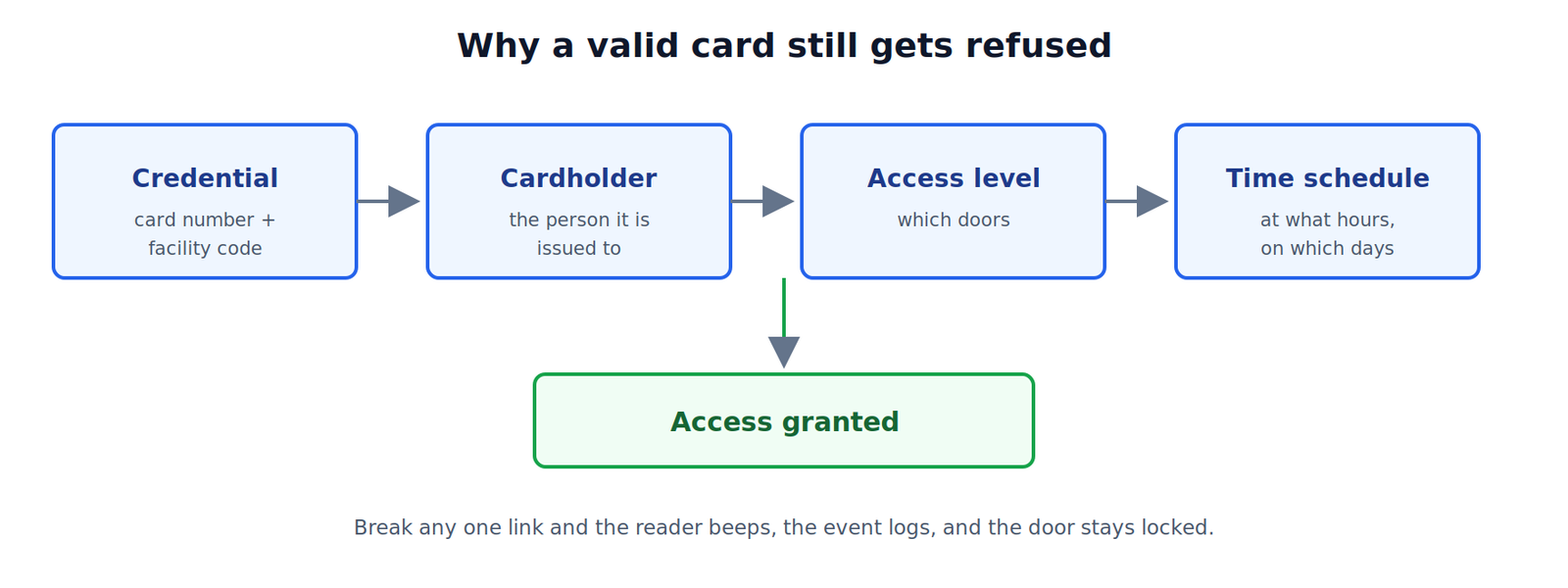
| Element | What it does | Example |
|---|---|---|
| Credential | Identifies the token | Card 12345, facility code 200 |
| Cardholder | Identifies the person | J. Smith, contractor |
| Access level | Which doors | Warehouse doors only |
| Time schedule | When | Mon–Fri 06:00–18:00 |
Most access denials on a working system come down to a mismatch in one of these four, not a hardware fault.
Card formats and facility codes
The card format is how the credential encodes its number, and the controller must be configured to match. Get it wrong and cards read at the reader but are never recognised.
| Format | What to record |
|---|---|
| 26-bit Wiegand | Facility code (0–255), card number (0–65535) |
| 34-bit / 37-bit | Card number range; whether a facility code is used |
| MIFARE / DESFire | Which sector or file is read, and the site key |
| 125 kHz prox | Number as printed vs as transmitted |
Order all credentials in one continuous range with the same facility code. Mixing ranges across orders is what causes the “we have run out of cards but the numbers are duplicated” problem two years later. Record the range in the handover pack. On HID Signo readers the facility code range is 1–255, with no default set from the factory.
Printed number vs transmitted number
The number printed on a card is frequently not the number the reader transmits. Common causes are decimal versus hexadecimal representation, internal card numbers on MIFARE, and a checksum digit.
Never assume. Enrol one card by presenting it at a reader, read the number the system actually captured, and compare it to the print. Once you know the relationship, bulk-enrol the rest by range.
Enrolment methods
- Present to reader. Put the system into enrolment mode and present the card at a nominated reader or a USB desktop enrolment reader. Most reliable. Use it for the first card of any new batch.
- Manual entry. Type the facility code and card number. Fast once you have verified the print-to-transmit relationship and hold a sequential batch.
- Bulk range import. Enter a start number and quantity, or import the CSV supplied with the batch. Import unassigned, then link cards to people as they are issued.
- Mobile credentials. Issued by email or app invitation. Provisioning happens in the manufacturer’s cloud portal, so plan for the site having working internet at handover.
Programming a standalone controller
Standalone units store users on the door and are programmed at the keypad. The sequence is generally:
- Enter programming mode with the master code. Change the default master code first — this is the most-skipped step on standalone installs.
- Select the user slot number. Record which slot holds which person on paper; the device will not tell you later.
- Present the card, or enter the PIN.
- Confirm and exit programming mode.
- Test the credential before leaving the door.
Standalone units hold a few hundred to a few thousand users, offer no audit trail, and require a visit to every door to remove a lost card. That last point is the practical limit — past roughly five to ten doors, move to a networked controller. See Stand Alone Access Control.
Programming a networked system
- Build time schedules first — the periods the site actually operates on. Include a public holiday calendar; New Zealand has regional anniversary days, so build the client’s actual region into it.
- Create access levels around roles, not individuals: Office staff, Warehouse, After-hours contractor, All doors 24/7.
- Create the cardholder record with a name, department and an expiry date where relevant.
- Assign the credential to the cardholder.
- Assign one or more access levels.
- Download to controllers. Many systems hold changes in the database until an explicit sync. If a new card does not work, check the change reached the panel before checking anything else.
- Test at a real door with the real card.
See Multi Door Access Control.
Lost or stolen card procedure
- Void the credential in the system immediately. Do not delete the cardholder record — that destroys the historical audit trail.
- Confirm the change has downloaded to all controllers.
- Issue a replacement with a new number. Never reissue the same number.
- If the door uses card and PIN, consider whether the PIN was compromised with the card.
- On a standalone system, visit each door and delete the user slot.
- Log the event, including the time the void took effect.
Handover advice for the client
- Set an expiry date on every contractor and visitor credential. Automatic expiry beats remembering to revoke.
- Never share a credential. It destroys the audit trail’s evidential value.
- Use roles, not per-person permissions. Fifty individually-configured cardholders becomes unmaintainable within a year.
- Review the cardholder list quarterly against the staff list. Ex-employee cards left active are the most common real-world access control failure.
- Keep a spare block of unissued cards in the same range, held securely.
- Record master and engineer codes in the handover documentation, changed from defaults.
Access logs are personal information. A credential database records who went where and when. Under the Privacy Act 2020 that is personal information, and Information Privacy Principle 5 requires reasonable safeguards against loss, misuse and unauthorised access. Advise the client to restrict historical movement logs to named managers and to set a documented retention period. Guidance is at privacy.org.nz.
Fault-finding
| Symptom | Cause to check first |
|---|---|
| Card beeps but access denied | No access level, or schedule excludes now |
| Card not recognised at all | Wrong bit format, or printed vs transmitted number |
| Works at one door, not another | Access level, or that panel has not synced |
| Worked yesterday, not today | Expiry date passed, or a holiday blocked the schedule |
| New batch all fail | Facility code differs from the previous batch |
| PIN works, card does not | Door set to card+PIN, or mode changed by schedule |
Specifying credentials for a new site? Connixtech’s technical team is available Monday–Friday, 8am–5pm NZT. Email info@connixtech.co.nz or call +64 27 284 7161.
Credential security assessments reflect publicly documented research and NXP’s own migration guidance as at September 2026. Cryptographic status changes — verify before specifying for a high-security site.