
Access Control Reader Wiring: Wiegand and OSDP
Knowledge Base › Access Control · Last reviewed September 2026 · Connixtech technical team
Access control readers talk to a door controller over one of two protocols. Wiegand is one-way and unencrypted, using two data lines. OSDP (Open Supervised Device Protocol) is a two-way RS-485 bus that supports encryption and supervision.
The cable is different, the wiring is different and the distance limits are different. This page is the bench reference for both, with figures taken from manufacturer installation documentation rather than rules of thumb.
Is OSDP better than Wiegand?
For new work, yes. Wiegand transmits the credential number in clear as a stream of pulses, so anyone who reaches the reader wiring on the unsecured side of the door can capture and replay it. It is also unsupervised: a cut cable looks identical to an idle reader. OSDP with Secure Channel encrypts the link and tells the controller when a reader stops responding.
Wiegand is not obsolete, and there is nothing wrong with maintaining an existing Wiegand install. But specifying it on a new commercial door in 2026 is a decision you should be able to justify.
| Wiegand | OSDP (RS-485) | |
|---|---|---|
| Physical layer | 2 data lines (D0/D1) | 1 twisted pair (A/B) |
| Direction | Reader to controller only | Two-way |
| Encryption | None | AES-128 Secure Channel |
| Supervision | None | Yes |
| Typical max run | 76–152 m, see below | Up to ~1200 m |
| Readers per run | One | Multiple, daisy-chained |
| LED and buzzer | Separate conductors | Over the same bus |
How to wire a Wiegand reader
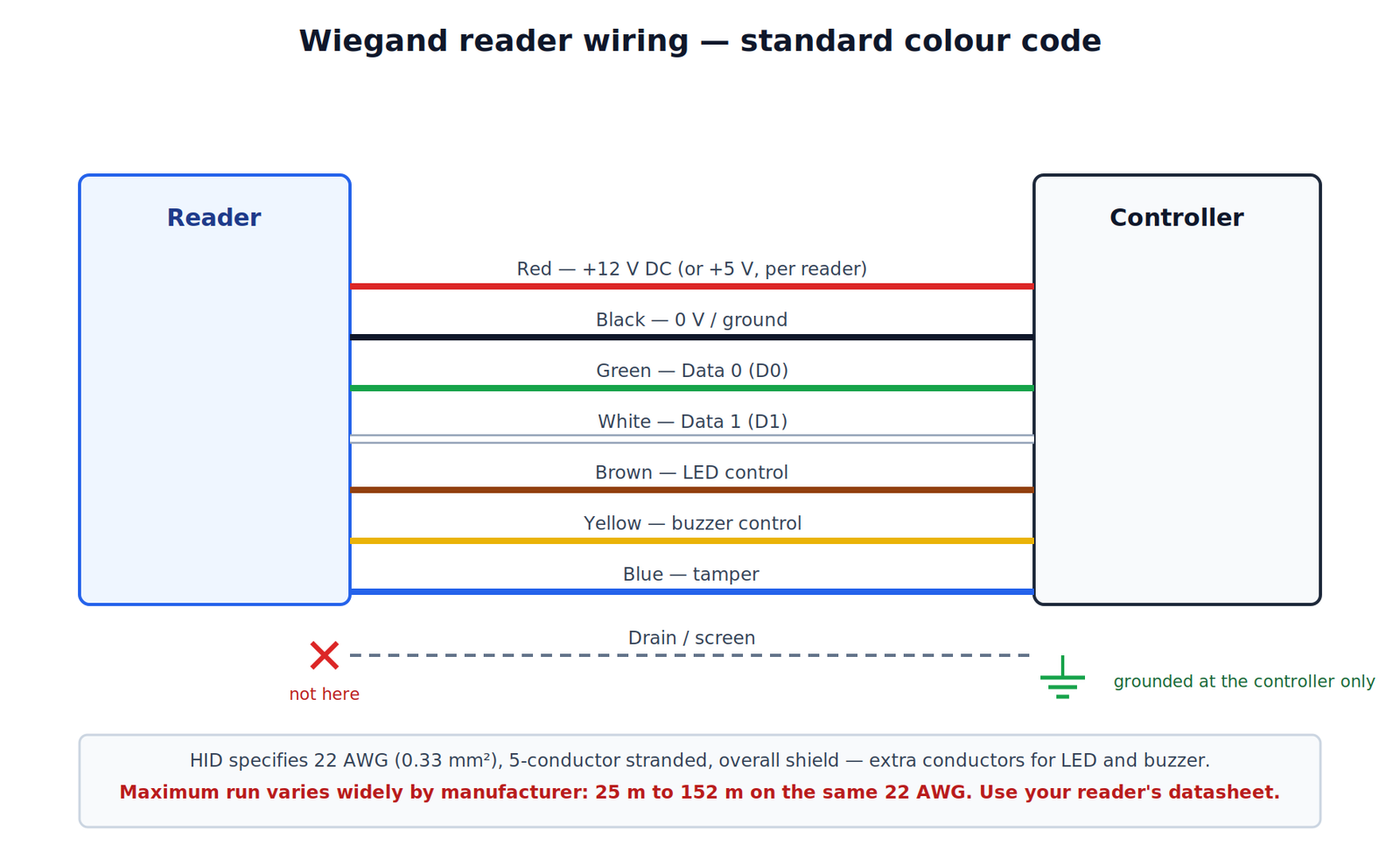
Colour code
Nearly all Wiegand readers follow this convention. Confirm against the reader’s own datasheet before you terminate — exceptions exist.
| Wire colour | Function |
|---|---|
| Red | +12 V DC (or +5 V, per reader) |
| Black | 0 V / ground |
| Green | Data 0 (D0) |
| White | Data 1 (D1) |
| Brown | LED control |
| Yellow | Buzzer control |
| Blue | Tamper |
| Drain / bare | Screen |
What cable does Wiegand need?
HID specifies 22 AWG (0.33 mm²), 5-conductor stranded with an overall shield — Alpha 1295 or equivalent — for its ProxPro readers, and notes that additional conductors are required for LED or beeper control. That is a reasonable default for any Wiegand reader.
Ground the drain wire at one end only, at the controller. Bonding both ends creates an earth loop, and it is the most common cause of intermittent reader faults and ghost reads.
Home run every reader back to the controller. Do not join in the ceiling, and do not share a conduit with mains. Cable: Security Cables.
How far can a Wiegand reader run?
This is where published figures disagree, so be careful which number you rely on.
| Source | Conductor | Stated maximum |
|---|---|---|
| HID ProxPro datasheet | 22 AWG shielded | 500 ft (152 m) |
| Common industry guidance | 18 AWG shielded | 500 ft (152 m) |
| Common industry guidance | 22 AWG shielded | 250 ft (76 m) |
| Paxton | 18 AWG | 100 m |
| Paxton | 22 AWG | 25 m |
Take the figure from your reader’s datasheet, not from a guide. The spread above is real: the same 22 AWG cable is rated at 152 m by one manufacturer and 25 m by another. Where you need distance, increase conductor size or move to OSDP.
Two limits apply and both must be met: the manufacturer’s stated signal distance, and enough voltage at the reader. A 120 mA reader at 100 m on thin cable can easily drop 2 V. Measure at the reader terminals under load, not at the panel.
Bit formats
The controller must be set to the format the credential encodes, or valid cards read but never grant access. If cards beep but every attempt is denied, check this before anything else.
| Format | Bits | Notes |
|---|---|---|
| Standard 26-bit | 26 | 8-bit facility code, 16-bit card number |
| 34-bit | 34 | Larger card number range |
| 37-bit | 37 | Common on higher-security credentials |
| Proprietary | Varies | Needs the definition from the supplier |
On HID Signo readers the facility code range is 1–255 and no default is set from the factory. Credentials: Card & Tags.
How do I wire an OSDP card reader?
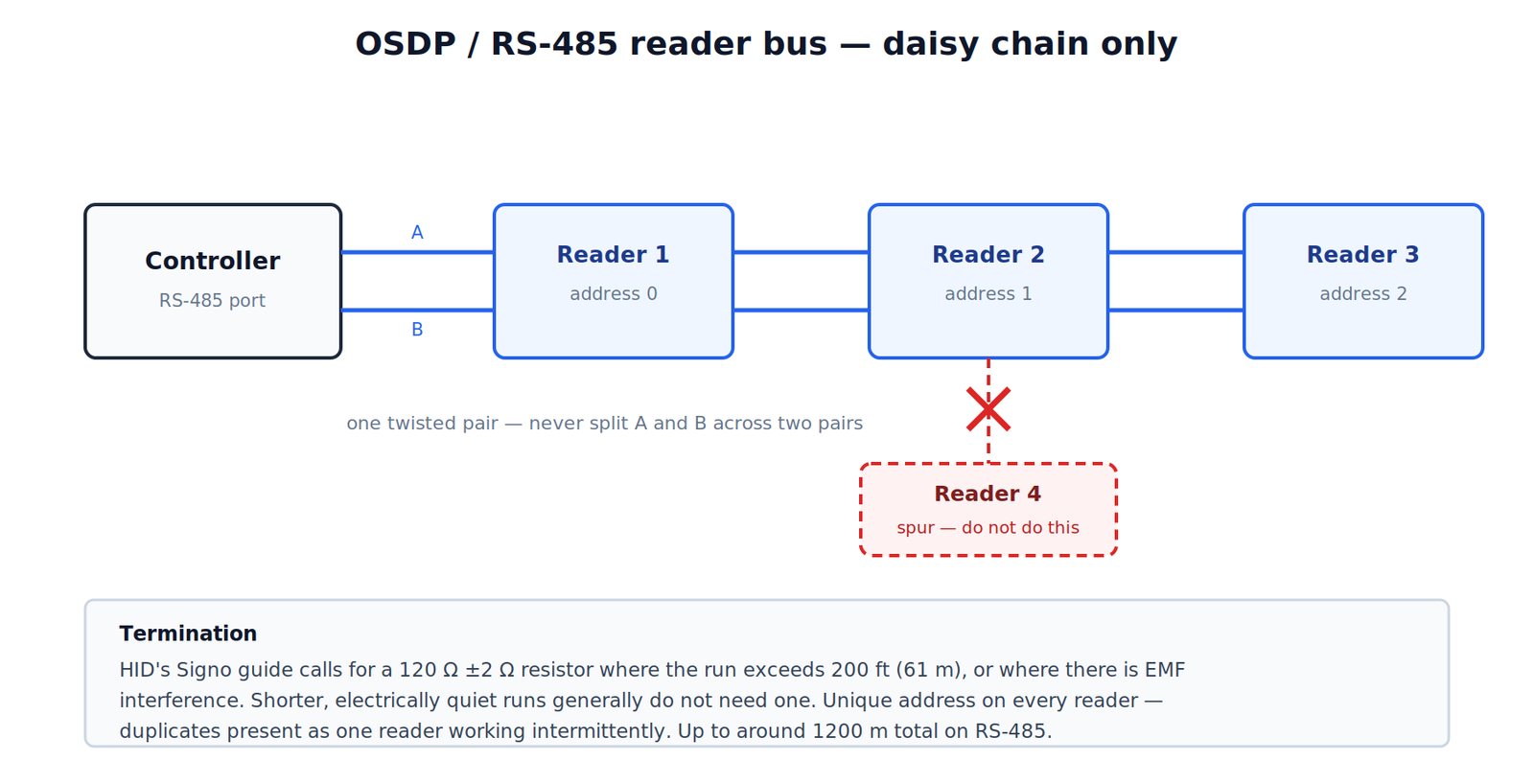
OSDP runs on RS-485 as a daisy chain — controller to reader 1 to reader 2 and so on. It is not a star. Spurs and star wiring cause reflections and unreliable comms even when total length is short.
| Terminal | Connects to |
|---|---|
| +V | Reader power (12 V DC typical) |
| GND / 0 V | Common 0 V across the bus |
| A (D+ / TX+) | A on every reader |
| B (D− / TX−) | B on every reader |
| Screen | Drain grounded at the controller only |
What type of wire is needed for OSDP?
Screened twisted pair with a characteristic impedance around 120 Ω. Keep A and B on a single pair — blue and blue-white, for example — and use a separate pair or separate cable for power. Do not split A and B across two different pairs.
Retrofitting OSDP onto existing Wiegand cable: HID notes the Data 0 and Data 1 conductors may be reused for OSDP, but warns that standard Wiegand cable may not meet RS-485 twisted-pair recommendations. It will often work on a short run. Do not assume it on a long one.
Cable: Network Cables.
Termination and addressing
- Termination: HID’s Signo installation guide calls for a 120 Ω ±2 Ω resistor where the OSDP run exceeds 200 ft (61 m), or where there is EMF interference. Short, quiet runs generally do not need it.
- Addressing: set a unique address on every reader. Duplicate addresses are the most common OSDP commissioning fault, and they present as one reader working intermittently rather than an obvious failure.
- Baud rate: match it across the bus. 9600 and 115200 are typical defaults.
- Secure Channel: enable it and install keys before handover. An OSDP install left in clear-text mode has thrown away the main reason to choose OSDP.
Readers and keypads: Readers, Keypads.
Fault-finding
| Symptom | First checks |
|---|---|
| No LED on the reader | Voltage at the reader under load; polarity |
| Reader beeps, no event at panel | D0/D1 swapped, or format mismatch |
| Ghost reads or extra digits | Drain grounded both ends; cable beside mains |
| All cards denied but reads log | Bit format or facility code mismatch |
| OSDP reader offline | Duplicate address; A/B swapped; termination |
| One OSDP reader works, others do not | Star wiring instead of daisy chain |
| Works cold, fails as it warms | Marginal voltage drop at the far reader |
Measurement tip: with the reader idle, D0 and D1 should each sit at supply voltage. Present a card and both lines pulse low. If one line sits low permanently, that conductor is shorted or the reader output has failed.
Need help specifying a system? Connixtech’s technical team is available Monday–Friday, 8am–5pm NZT. Email info@connixtech.co.nz or call +64 27 284 7161. Trade customers can download datasheets from the Downloads page.
Figures on this page come from HID ProxPro and HID Signo installation documentation and general industry guidance. Always work to the datasheet for the specific reader and controller you are installing.