
Alarm Communicator Setup (IP and 4G)
Alarm Communicator Setup (IP and 4G)
Knowledge Base › Alarm Systems · Last reviewed September 2026 · Connixtech technical team
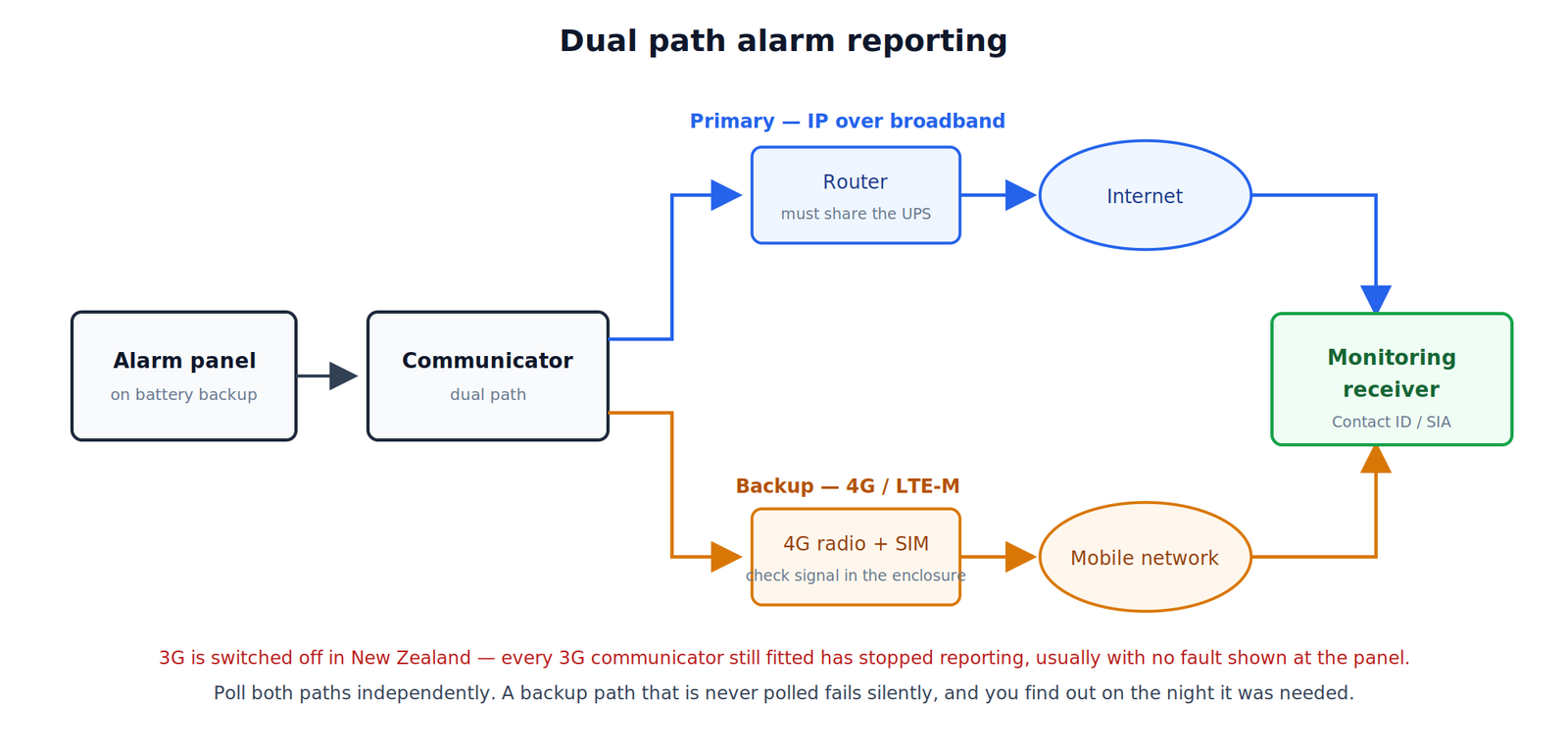
An alarm communicator transmits events from the panel to a monitoring station. In New Zealand today that means IP over the site’s broadband, 4G cellular, or both as a dual path. The two older methods are gone.
Do 3G alarm communicators still work in New Zealand?
No. New Zealand’s mobile operators — 2degrees, One NZ and Spark — shut down their 3G networks from the end of 2025, with the last operator completing its shutdown on 31 March 2026. The NZ Telecommunications Forum specifically warned that 3G-reliant devices, including security and medical alarms, would stop working.
Any 3G communicator still fitted is no longer reporting — and it may show no fault at the panel. On every service visit to an older site, check what the communicator actually is and test transmission to the monitoring station. A panel that has quietly stopped reporting looks completely normal from the keypad.
PSTN is going the same way. Copper voice lines are being withdrawn as fibre rolls out, and diallers connected through a VoIP adapter are unreliable: DTMF handshake tones frequently do not survive the codec, so signals fail intermittently in a way that is very hard to diagnose.
Which standard covers alarm transmission?
AS/NZS 2201.5:2008 sets a rating system for alarm transmission systems and paths. It is a separate part from AS/NZS 2201.1, which covers the client’s premises and explicitly excludes transmission to a remote centre.
If an insurer or monitoring provider specifies a grade for the transmission path, that is the standard they are referencing. Confirm the required grade before you quote, because it drives whether single or dual path is acceptable and how often the path must be polled.
Choosing a path
| Path | Runs in a power cut | Runs in an internet outage | Ongoing cost |
|---|---|---|---|
| IP (broadband) | Only if router on UPS | No | Nil beyond broadband |
| 4G cellular | Yes, on panel battery | Yes | SIM plan |
| Dual path | Yes | Yes | SIM plan |
Specify dual path for any commercial or insurance-driven site. Broadband outages and deliberate cable cuts are both real, and the point of monitoring is that it works when things go wrong. For a residential site with a modest risk profile, single-path IP with app notification may be adequate — say so explicitly, so the trade-off is the client’s decision.
Before you configure anything
Request from the monitoring station in writing: account number; receiver IP address and port or domain; reporting protocol (Contact ID or SIA); encryption key where required; polling interval for the grade of service; secondary receiver details; and the test procedure.
Put the account on test before you start generating alarms. Failing to do this results in an unnecessary response callout and an unhappy client.
IP path setup
- Connect to a switch port on the client’s LAN — not a spare port on something that gets unplugged.
- Assign a static IP inside the client’s subnet, outside the DHCP scope, with correct mask, gateway and DNS.
- Enter receiver IP or domain, port, account number, protocol and encryption key.
- Set the polling interval as specified. Polling is how the receiver knows the path is alive — without it, a dead communicator is indistinguishable from a quiet site.
- Confirm the communicator reports connected, and ask the monitoring station to confirm they see the path online.
Firewall note: most modern communicators connect outbound, so no inbound rules are needed. If the client has a restrictive outbound firewall, arrange the destination IP and port with their IT before install day.
Put the router on the same backed-up supply as the alarm, or the IP path dies with the first power cut — precisely when it matters.
4G path setup
- Check signal at the actual panel location, in the enclosure, with the lid on. Metal enclosures and plant rooms attenuate badly. Record the signal strength as a baseline for future service.
- If signal is marginal, relocate the antenna outside the enclosure or use an external antenna. Do not accept a marginal reading and hope.
- Fit a 4G/LTE data SIM on a network with coverage at that address. Coverage differs by operator, particularly rural.
- Enter the APN supplied with the SIM.
- Enter receiver details as for IP, then confirm network registration and receiver connection.
- Record the SIM number, plan, expiry and who pays for it in the handover pack.
An expired or unpaid SIM is one of the most common causes of a silently non-reporting site. Consider LTE-M or NB-IoT communicators where available — designed for low-data always-on devices, with better building penetration.
Dual path configuration
- Set the primary path (usually IP) and the backup (4G).
- Set switchover behaviour: how many failed attempts, or how long, before failing over.
- Set independent polling on both paths. If only the primary is polled, a failed backup goes unnoticed until the day it is needed.
- Configure a path fault as a reportable event, both to the monitoring station and at the keypad.
- Test each path independently by disabling the other.
Testing
- Account confirmed on test before starting
- Every event type transmitted and confirmed: intruder, panic, tamper, mains fail, low battery, open/close, periodic test
- Zone numbers and descriptions confirmed correct at the monitoring station end — a signal arriving with the wrong zone label is worse than no signal
- IP path tested with 4G disconnected
- 4G path tested with Ethernet unplugged
- Failover time measured and recorded
- Path fail event confirmed received
- Mains removed: system and communicator run the required standby period
- Periodic test signal scheduled and confirmed
- Account taken off test; keyholder list confirmed
Pull the network cable and leave it out longer than the failover time. A dual path never tested by actually breaking the primary is an untested dual path.
App notification is not monitoring
Many panels push notifications to the client’s phone. Useful, but not a substitute for professional monitoring — nobody responds while the client is asleep or overseas, and insurers generally do not recognise it. Set expectations in writing: self-monitoring notifies, monitoring responds.
Fault-finding
| Symptom | First checks |
|---|---|
| No connection to receiver | Receiver IP/port typo; account number; firewall |
| Registers but signals rejected | Wrong protocol; wrong encryption key |
| Works on the bench, not on site | 4G signal in the enclosure; site firewall; VLAN |
| Intermittent path faults | Marginal 4G; router rebooting; DHCP changing |
| Wrong zone descriptions | Zone mapping at the monitoring station |
| Stopped months ago, no fault | 3G communicator on a dead network, or expired SIM |
| Fine until a power cut | Router not on backed-up supply, no cellular backup |
Specifying a monitored system? Connixtech’s technical team is available Monday–Friday, 8am–5pm NZT. Email info@connixtech.co.nz or call +64 27 284 7161. See also Alarm Panel Programming and Alarm Zone Configuration.
3G shutdown dates verified via the NZ Telecommunications Forum, September 2026. Transmission standard references via Standards New Zealand.